



cXML vs OCI: what is the difference and which one to choose?
cXML and OCI are the two dominant formats in B2B PunchOut. Their origins, technical mechanisms, and use cases are very different. This guide helps you understand which one you will encounter and how to handle them.
In this article
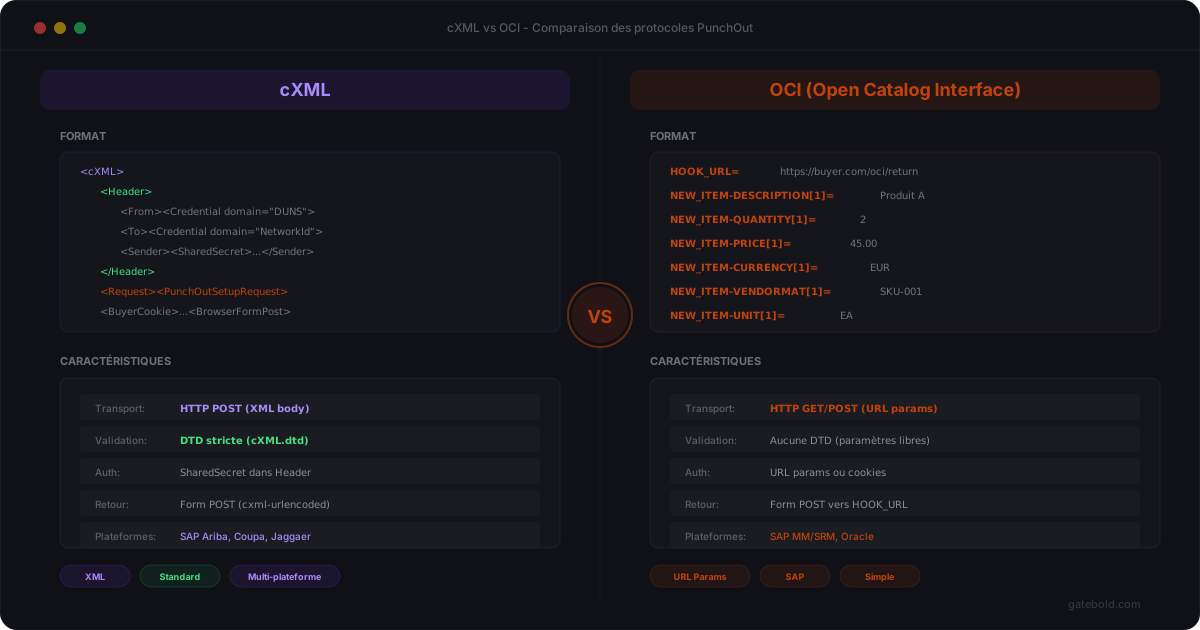
In short: cXML is the XML protocol created by Ariba, adopted by Coupa, Oracle Procurement, Jaggaer, etc.; OCI is SAP’s historical HTML standard. You rarely choose - the buyer imposes theirs. A good PunchOut platform handles both.
When starting a PunchOut project, one question comes up quickly: cXML or OCI? These are the two dominant exchange formats in B2B e-procurement. They broadly do the same thing - allow a requisitioner to browse a supplier catalog and send back a cart - but with very different mechanisms.
Origins
cXML (commerce XML) was created by Ariba in the late 1990s. It is a full XML format with a set of standardized messages. It has become the de facto standard for procurement systems like SAP Ariba, Coupa, Jaggaer, and Oracle Procurement.
OCI (Open Catalog Interface) was created by SAP to connect its systems (SAP SRM, SAP S/4HANA) to external supplier catalogs. It is a simpler mechanism based on URL parameters and HTML forms.
Technical comparison
| cXML | OCI | |
|---|---|---|
| Format | Structured XML | URL parameters / HTML form |
| Creator | Ariba (SAP) | SAP |
| Session opening | PunchOutSetupRequest (XML POST) | URL with parameters (HOOK_URL, OCI_VERSION) |
| Cart return | PunchOutOrderMessage (XML POST) | HTML form POST to HOOK_URL |
| Authentication | SharedSecret in the XML | URL parameters or header |
| Complexity | High (DTD, validation, nesting) | Low (key=value) |
| Systems | Ariba, Coupa, Jaggaer, Oracle | SAP SRM, SAP S/4HANA |
| Mapping | Rich (ItemIn, Extrinsic, UOM...) | Simplified (NEW_ITEM-DESCRIPTION, etc.) |
The cXML flow
Procurement system
Sends a PunchOutSetupRequest (complete XML document with credentials)
Supplier
Returns a PunchOutSetupResponse with the session URL
Requisitioner
Browses the catalog, builds the cart
Supplier
Sends the PunchOutOrderMessage (XML) to the BrowserFormPost
cXML exchanges complete XML documents at each step. Authentication, product data, prices, taxes - everything is structured in the XML.
The OCI flow
SAP (buyer)
URL redirect with parameters (HOOK_URL, OCI_VERSION)
Requisitioner
Browses the catalog, builds the cart
Supplier
HTML form POST to HOOK_URL with NEW_ITEM-* fields
OCI is simpler: no XML, no DTD, no PunchOutSetupRequest. The procurement system redirects the requisitioner with a URL containing a HOOK_URL (the return address). The supplier sends back the cart via a standard HTML form with fields named NEW_ITEM-DESCRIPTION[1], NEW_ITEM-PRICE[1], etc.
When to use which?
You do not get to choose - the buyer dictates the format.
- If your client uses SAP Ariba, Coupa, Jaggaer, Oracle -> they will request cXML (see our PunchOut SAP Ariba on Magento guide for a concrete walkthrough)
- If your client uses SAP SRM or SAP S/4HANA directly -> they will request OCI
- Some SAP clients use Ariba as an intermediate layer -> in that case it is cXML even if the backend is SAP
In practice, if you sell to multiple large enterprises, you will need both formats.
Differences that matter in integration
Mapping complexity
In cXML, the PunchOutOrderMessage is a rich XML document with nested nodes (ItemIn, ItemDetail, UnitPrice, Classification, Extrinsic). The mapping is powerful but complex - particularly for product classification, as detailed in our UNSPSC mapping guide.
In OCI, the cart return is a set of flat key=value pairs. Simpler to build, but less expressive.
Validation
cXML has an official DTD. Each message can (and should) be validated against this DTD. Structural errors are automatically detectable.
OCI has no formal schema. Errors are detected on the SAP side upon reception, often without an explicit error message.
Security
cXML embeds authentication within the message itself (SharedSecret). OCI passes authentication via the URL or HTTP headers - less structured but functional.
How Gatebold handles both
Gatebold supports cXML and OCI natively. Configuration is done per buyer:
- An Ariba buyer -> cXML connection with their shared secret and mapping
- A SAP SRM buyer -> OCI connection with their HOOK_URL and fields
- Both coexist on the same platform, with the same Magento connector
The mapping is adapted to each buyer’s format. Observability traces exchanges regardless of the protocol.
Summary
| cXML | OCI | |
|---|---|---|
| When | Ariba, Coupa, Jaggaer, Oracle | SAP SRM, SAP S/4HANA |
| How | Structured XML, DTD | URL + HTML form |
| Complexity | High | Low |
| Expressiveness | Rich | Basic |
The question is not “which one to choose” but “which one does your buyer use.” And if you have multiple buyers, you will need both.
On the cXML side, you can test your messages directly with our free cXML validator against the official 1.2.070 DTD - useful before going live with a new Ariba or Coupa buyer.
On the OCI side, our free OCI validator covers the setup request and HOOK_URL cart return, with automatic detection of PRICEUNIT inconsistencies (the #1 source of x1000 pricing errors in SAP integrations), forbidden [0] indices and units not mapped in T006. The 38-field OCI reference lists every NEW_ITEM-* and setup parameter, with format, length, version 4.0/5.0 and bilingual descriptions. To get started quickly, 7 OCI PunchOut payload examples are ready to copy or to one-click test in the validator.